STINTMONUsage monitor – home page Get the app
Features

Everything it watches, so you don’t have to.

Stintmon is a monitor. It shows you the meters, the pace and the sessions, on the PC and on the phone, and it leaves the decisions to you.

01 · The meters

Two limits. Every account.

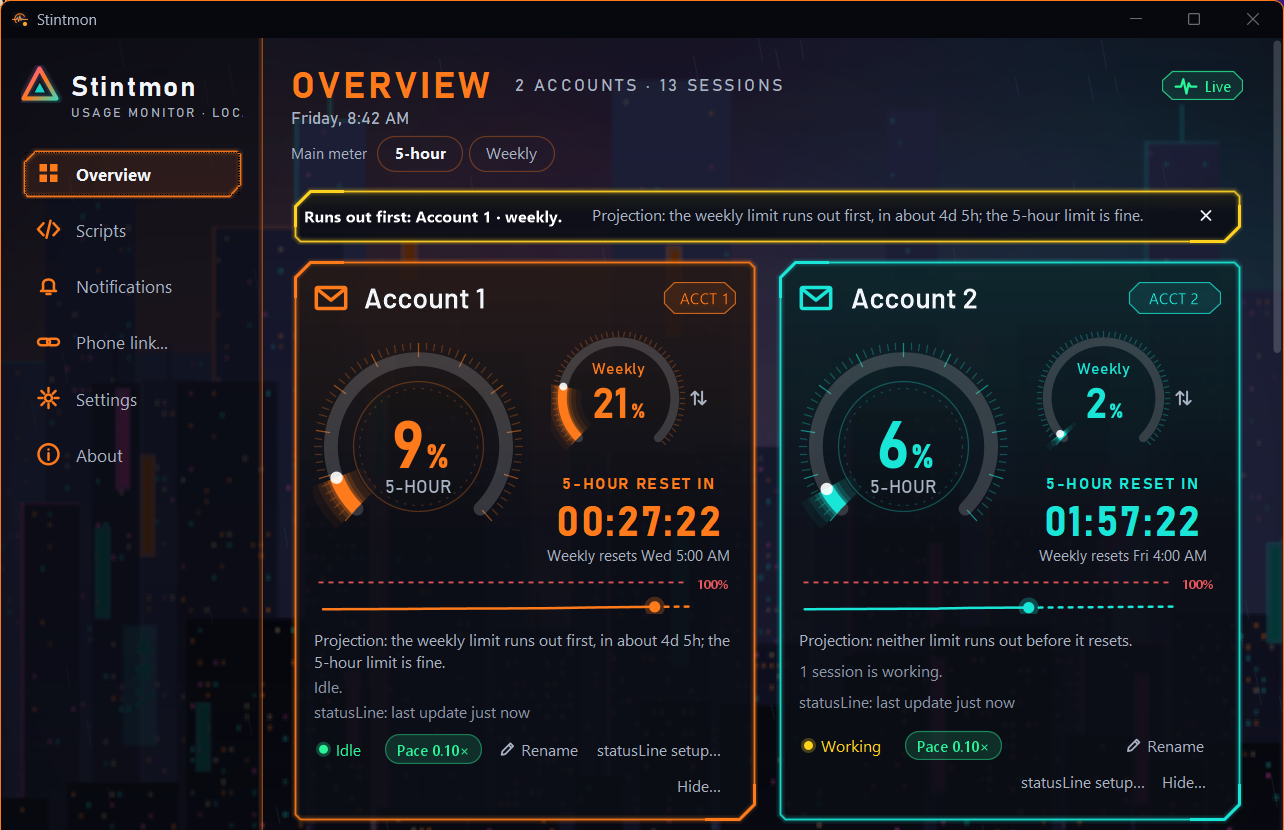
Each account gets a card with a ring for the 5-hour limit, a ring for the weekly limit, and a countdown to the next reset. Pick which meter is the big one.

  • A colour of its own for each account: orange, teal, pink, lime, violet, blue.
  • Amber from 75%, red from 95%, on every screen.
  • The figures come from what Claude Code reports to its status line, filled in between updates with estimates from the usage files on your PC.
  • Estimates are labelled “est.”. With nothing to go on, a meter says “no data” rather than guess.
Account 1Acct 1
38%5-HOUR
61%WEEKLY
5-hour reset in
02:14:09
Weekly resets Wed 5:00 AM
100%

Projection: the weekly limit runs out first, in about 2d 4h; the 5-hour limit is fine.

WorkingPace 0.92×
Illustration · demo numbers
02 · Pace and run-out

Will it last until the reset?

A percentage alone does not tell you much at 2 PM. Stintmon compares what you have used with how much of the window has gone by.

  • Pace: ahead of an even burn, behind it, or on pace.
  • Projection: when the limit would run out at the current rate, or that it will not run out before it resets.
  • Runs out first: one sentence that names the account and the limit that goes first.
  • Always called a projection, never shown as a fact.
This 5-hour windowPace 1.18×
100%

Ahead of pace: 58% used with 49% of the window gone. Projection: about 86% at the reset.

Illustration · demo numbers
03 · Sessions

Which session is eating it?

Every open session is listed with a light, its share of the 5-hour window and a running timer. Click one for what it is working on.

  • Yellow working, green idle, red stuck or possibly waiting for your answer. Each light carries a word too, so colour is never the only clue.
  • Grouped as Needs attention, Working and Idle.
  • The top user of the current window is called out by name.
  • Closed sessions stay on the list, greyed, until midnight.
Open sessions · 41 needs attention
StatusSessionAccount5-hourRunning
Workingmy-projectAccount 124%00:41:12
Workingdocs-siteAccount 114%00:18:40
Idleapi-serverAccount 212%01:22:05
Needs attentiondata-importAccount 23%00:06:31
Illustration · demo numbers
04 · Tokens and history

Where it went, and when.

Stintmon sorts each reply into a kind of work as it reads the file, and keeps only the kind. Over days and weeks that turns into a picture of how you spend your limits.

  • Where the tokens went: building code, testing, reading and research, planning and talk, other.
  • History by hour, day and month, a heat map of your busy hours, and each window's peak.
  • Kept on your PC only, for as long as you choose. Export it as a CSV file when you want it.
Where the tokens wentThis week
  • Building code41%
  • Testing17%
  • Reading and research23%
  • Planning and talk12%
  • Other7%
Busy hours7 days
12 AM6 AMNOON6 PM11 PM
Illustration · demo numbers
Also in the box

The small things that add up.

Notifications

Alerts at 50, 75, 90 and 100% for each account and meter, with quiet hours. Old readings never alert.

Tiles for other AI tools

Up to four extra tiles, for Grok, Gemini or any tool that can write a small JSON usage file. Stintmon reads that file and nothing else.

API usage card

Add your own provider API key on the PC to see API usage and cost where the provider shares them. Keys stay sealed on the PC.

Watchers and monitors

Run your own small scripts from the Scripts page and see their state. Let your phone switch one on or off, if you allow it.

Lives in the tray

A tray icon that shows the worst light at a glance. Start it with Windows if you like.

Neon City or Classic

Two looks. Reduce motion stops the rain and the flicker, in the app and on this site.

Demo mode

Fills every screen with clearly marked demo numbers, for trying things out. Demo numbers are never sent to a phone.

Next reset in your calendar

Add the next reset to your own calendar app, or keep a small local status file for your own tools.

Delete all Stintmon data

One button removes everything Stintmon has stored on the PC and unpairs your phones.

05 · The Android app

Your meters, in your pocket.

The phone shows what your PC sends it: the names you chose, percentages, reset times, status lights and numbered sessions. Up to four PCs can feed one phone.
  • Widget: one account at a time, taking turns.
  • Quick Settings tile: the fullest account's percent and light.
  • Ongoing notification, with the numbers kept off the lock screen by default.
  • Floating dial: opt-in, two rings and a countdown, kept clear of the navigation bar.
  • App lock with Android's own fingerprint or face prompt, and a Lost phone button on the PC that cuts a phone off at once.
Illustration · demo numbers
The Stintmon Overview on Windows with two account cards in the Neon City look.
Real screenshot of the Windows app's Overview. Account names replaced; nothing else changed.

A monitor, and only a monitor

Stintmon watches and reports. It does not switch accounts for you, rotate between them, pool them or get around a limit, and it never will. The apps have no accounts, no ads, no analytics and no crash reporting. The figures it shows are estimates, worked out on your own PC.

Watch the meter, not the clock.

Free for Windows. The Android app is on its way to Google Play.

Windows 10 or 11 · Android 14 or newer · Not available in the EU, EEA, UK or Switzerland yet. · What Windows may ask on first run